Claude Managed Agents: What You Get, What You Give Up
For teams getting started with agentic AI, a managed solution is the fastest route from prototype to production. This post covers Claude Managed Agents (CMA), the first one I have put through its paces. There will likely be follow-up posts on alternate solutions in this space.
One post, three goals
This post serves three different purposes:
- A gist of CMA. The highlights and the case for managed agents, with links to the official docs for the rest. It does not replace the docs.
- A talk outline. For a 15-minute session I am giving in two weeks at a Claude meetup in San Diego. Attendees can use this post for the details I will not have time to cover.
- A learning demo. Conference Concierge is a self-paced, code-first tour of CMA: the code, YAML, and prompts behind each feature. Reading the code and following the guides takes about an hour.
The 3-minute drill
- What it is. CMA is managed infrastructure for running Claude as an agent. Anthropic supplies the harness (the loop and scaffolding around the model) and the hard plumbing beneath it: isolated sandboxes, durable session state, tool execution, credentials, and permissions, all behind one API. You describe the agent, and the platform underneath is already built.
- Why I care. An agent loop takes a few days to write (and eval); making it safe, secure, resumable, and observable in production takes weeks. Architecting it to scale to millions of sessions takes even longer. I would rather spend all that time focused on what my agent does, if an out of the box solution meets my production launch needs.
- My top lesson: you also inherit the vendor’s innovation. Beyond the plumbing, Anthropic includes useful multi-agent patterns. Outcomes, dynamic workflows, and the advisor are hard to build well, and in CMA they arrive as configuration. Dreaming and MCP tunnels are further examples. All are explained below.
- What you give up. CMA only supports Anthropic’s models, and Anthropic’s agent harness. You also give up some privacy and data sovereignty. See details below.
- Self-hosting. CMA offers two self-hosting options: Host only the sandbox, or host the whole service. Each option gives you more control, but you will lose platform features and will need to implement workarounds or alternative solutions to match the native functionality.
- My take. If you are committed to Claude, want long-running asynchronous agents at scale, and CMA meets your privacy and data requirements, start here. Don’t overbuild early.
Tour the features in code
Conference Concierge is the sample I refer to throughout. A small team of agents helps run a user-group meetup: members propose talks, agents review and grade them, an organizer approves the agenda, speakers get a sponsor perk, and attendees ask a helper agent about the venue. Each “Guide” link in this post points to a short how-to in the repo that shows one feature in code. The full tour is at the end.
Why go managed
My working definition: the harness is the scaffolding around an LLM. It takes an objective and orchestrates the context, tools, and state, across as many steps as it takes, to achieve it within the desired guardrails and verification rules.
Writing an agent’s loop is not hard. Readying it for production is the long part. A managed agents platform rents you both the harness and the infrastructure around it. The benefits I see:
- You skip the undifferentiated work. The loop, tool execution, prompt caching, compaction, and crash recovery come built in.
- Sessions can run for hours and resume. State lives on the server, so a dropped connection or a pause for approval does not lose the work.
- Security plumbing is included. Isolated sandboxes, credential vaults, and per-tool permission policies are configuration instead of a project.
- The harness keeps up with the model. The vendor tunes the harness for each model release. I do not have to re-tune my own.
- Operations come with it. Versioned agents, schedules, budgets, event history, and tracing are there from the first session.
- You inherit the vendor’s patterns and innovation. New patterns and best practices arrive as the vendor ships them, as configuration you turn on, with nothing for you to build or maintain.
- Agents become configuration. An agent is a file I can review, diff, and roll back.
The price is control, and I cover that in “What you give up” below.
The field
Every major vendor shipped a hosted agent runtime in 2026. This post only covers CMA, but I recommend you explore these alternatives, depending on your model and vendor preferences.
| Offering | Who brings the harness | Models | Notes |
|---|---|---|---|
| Claude Managed Agents | Anthropic | Claude | Beta since April 2026. Cloud or self-hosted sandboxes, plus a self-hosted service |
| OpenAI Agents API | OpenAI (the managed Codex harness) | OpenAI | Beta. OpenAI-hosted sandbox, self-hosted sandbox, or none |
| LangChain Managed Deep Agents | LangChain (the open-source Deep Agents harness) | Your choice | Public beta on LangSmith. The agent is a folder of files |
| Amazon Bedrock AgentCore harness | AWS (powered by Strands) | Bedrock, OpenAI, Gemini | Generally available since June 2026 |
| Managed Agents API on Gemini Enterprise Agent Platform | Gemini and partner models | Config-driven API with a managed sandbox | |
| Microsoft Foundry hosted agents | You (your code in a container) | Foundry model catalog | Foundry runs the runtime, you keep the loop |
This space moves fast, so check each page for current status.
CMA at a glance
CMA is Anthropic’s pre-built agent harness running on managed infrastructure. It is aimed at long-running and asynchronous work. For custom loops and fine-grained control, Anthropic points you to the Messages API instead.
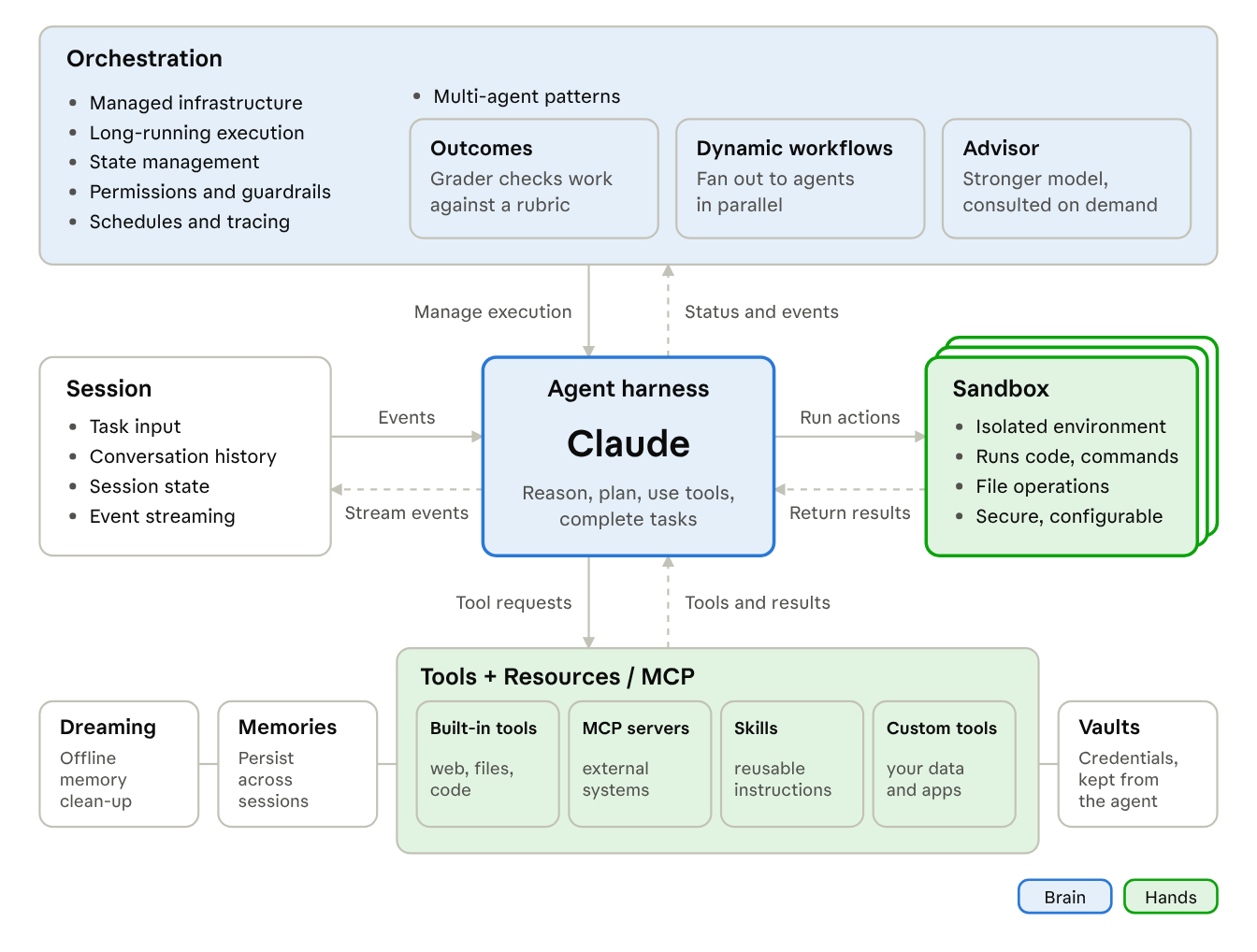
Blue marks the brain: Claude, the agent loop, and the orchestration around it.
Green marks the hands: the sandboxes and tools that act on its behalf. More on this split in the principles below.
Your application only talks to the service through events. The harness reads the session, calls Claude, and sends tool calls to the sandbox or to MCP servers.
The flow has five steps:
- Create an agent. Model, system prompt, tools, MCP servers, and skills. You create it once and reference it by ID.
- Create an environment. A cloud sandbox, or a sandbox on your own infrastructure.
- Start a session. It ties one agent to one environment for one task.
- Send events and stream responses. You send user events. Claude runs tools and streams results back over SSE.
- Steer or interrupt. You can send more events while the agent works.
An agent definition is a short file. This one is the demo’s Attendee Helper, trimmed and condensed:
---
name: attendee-helper
description: Answers attendee questions about the event and venue.
model: claude-haiku-5-5
tools:
  - type: agent_toolset_20260401
    default_config: {enabled: false}
    configs:
      - {name: read, enabled: true, permission_policy: {type: always_allow}}
---

You are the friendly helper for a local user-group meetup.
Answer only from the venue files. If the answer is not there, say you don't know.
Out of the box the agent gets bash, file tools (read, write, edit, glob, grep), web search and fetch, and MCP. See Tools.
To try it, you need a Claude API key and a few minutes with the quickstart. The ant CLI (Anthropic’s command-line tool) is optional, but it is what my demo uses to apply agents as files. You can also create and configure all options using the API or the Console; please choose one that lets you save your infrastructure as code.
CMA is in beta on the Claude API, Claude Platform on AWS, and Claude Models on Google Cloud, with some feature differences on the cloud platforms.
Design principles
Anthropic’s engineering post, Scaling Managed Agents with stable interfaces, is the best single read on the design. My summary of the ideas that shaped how I built on it:
- Stable interfaces, replaceable harness. Harnesses encode assumptions that go stale as models improve. CMA commits to a few abstractions (session, harness, sandbox) and keeps the freedom to change what sits behind them.
- The brain is separate from the hands. Claude and the loop run in one place. Sandboxes and tools run in another. Either can fail or be swapped without taking the other down. For example, say a sandbox dies halfway through a long test run. The harness reports it to Claude as a failed tool call, Claude decides whether to retry, and a fresh sandbox is provisioned from the same recipe. The reverse holds too: if the harness crashes, a new one reloads the session log and continues from the last event.
- The session is the source of truth. It is an append-only event log that lives outside the harness. A crashed harness reloads the session event log and resumes.
- Sandboxes are disposable. A dead container is a tool error that Claude can react to, not a lost session. Sandboxes are provisioned only when needed, which Anthropic says cut median time-to-first-token by about 60%.
- Credentials stay out of reach. Code the agent writes never sees tokens. MCP calls go through a proxy that pulls credentials from a vault.
- Many brains, many hands. Because the loop does not live in the container, one session can use several sandboxes, and agents can hand work to each other.
Extra observations:
- Everything is an event. Messages, tool calls, approvals, grader verdicts, and sub-agent activity arrive on one stream. My whole client is one event loop.
- Resources are declarative and versioned. Agents, environments, memory stores, and deployments live as files and are applied with the
antCLI, much like infrastructure as code.
The primitives
The docs name four core concepts: agent, environment, session, and events.
In practice I used about ten resource types that I consider primitives. The last column points to the Conference Concierge guide that shows each one in code.
| Primitive | What it is | Docs | Guide |
|---|---|---|---|
| Agent | Model, system prompt, tools, MCP servers, and skills. Versioned on every change | Agent setup | 01, 02 |
| Environment | Where tools run: a cloud sandbox or your own | Choosing an environment | 20 |
| Session | One running agent, in one environment, on one task. Holds history and files | Sessions | 03 |
| Events | Everything exchanged with a session, in both directions | Events and streaming | 12 |
| Deployment | A stored recipe for unattended sessions: a pinned agent version, an environment, vaults, resources, a per-run budget, the first events, and a cron schedule | Scheduled deployments | 10 |
| Vault | Vaults and credentials are authentication primitives that let you register credentials for third-party services once and reference them by ID at session creation | Vaults | 06, 07 |
| Memory store | Text documents that persist across sessions, mounted as files | Memory stores | 04 |
| Threads | The sub-conversations inside a multi-agent session | Session threads | 08 |
| Skills and files | Packaged instructions, and files mounted into the sandbox | Skills, Files | |
| Webhooks | Push notifications for session, agent, vault, and deployment changes | Webhooks |
A deployment deserves a security review of its own. Nobody is attached when it fires, so it decides in advance which credentials and resources each run can reach, and its tools have to run without approval. The per-run budget is the main backstop, and a missing or archived vault fails or pauses the run.
Tools deserve one extra note, because the choice is about trust more than capability. Built-in tools (e.g., bash, web search) run on Anthropic’s side and are covered by permission policies. MCP invocations also start on Anthropic’s side and are permissioned and secured - though the MCP code executes in your (external) end point.
Custom tools run in your application, so credentials and approval logic stay with you, but your app has to be online to answer.
More than infrastructure
Here are a few examples of the agentic orchestration features available in CMA:
- Sub-agents. A coordinator hands well-scoped tasks to a roster of specialist agents, each with its own context. This is the base pattern that workflows and the advisor build on. (Guide 08)
- Outcomes. You hand the session a deliverable and a rubric. A separate grader, with its own context, sends the agent back to work until the rubric is met or the iteration cap is hit. Lesson learned: write rubric lines that can be checked, and give the grader ground truth to check against. (Guide 11)
- Dynamic workflows. The coordinator writes a small program that fans work out to many agents in phases, and the server runs it in the background. In my demo, one reviewer per talk proposal ran in parallel. Watch out: a workflow keeps running after the coordinator goes idle, so idle does not always mean done. (Guide 08)
- Advisor. An agent on a faster model consults a stronger model at the moments that matter. It took two lines of configuration and one line in the system prompt. With some advisor models the advice comes back redacted to your client, so plan your logging around that. (Guide 09)
And a few infrastructure features that not every managed offering includes:
- Dreaming. An offline job reviews a memory store plus past session transcripts and writes a cleaned-up copy: duplicates merged, stale entries replaced. The input store is never touched. It is a research preview, and I have not used it in the demo yet.
- Versioning everywhere. Every agent change creates a new version, and sessions can pin one. Memory changes are versioned too, which gives you an audit trail and rollback. (Guide 02)
- Budgets and approvals. A session pauses at its spending cap instead of dying, and
always_asktools wait for a person to respond. (Guide 12) - Tracing. Sessions emit OpenTelemetry data, so one trace can follow a request from my CLI through the session. (Guide 05)
- MCP tunnels. Securely connect Claude to MCP servers running in your private network without opening inbound ports or exposing services to the public internet. Requires Cloudflare’s open-source tunnel connector.
- Developer experience. You can use ant CLI to deploy & manage resources. There is a Console with a good session inspector, SDKs in most popular languages, etc.
What you give up
This list is not exhaustive; check your own requirements. Also, if you are hosting in Claude Platform on AWS or Google Cloud, double-check if the features are supported and behave at parity.
- It is Claude only, and it is a beta. The self-hosted service can run on Bedrock, Google Cloud, Foundry or any gateway, as long as you use Claude models. Memory stores and dreaming carry their own beta headers, and dreaming and MCP tunnels are research previews.
- No Zero Data Retention on the hosted service. Sessions are stateful by design, so hosted CMA is not eligible for ZDR or for HIPAA BAA coverage. Self-hosting the whole service is the ZDR exception. You can delete sessions and files at any time.
- Data residency. Inference for CMA is “us” or “global”. Neither gives you an “EU-only” option, which matters if you have EU data-residency requirements. If you want to be US-only, you can pin to the US, but it costs 1.1x the standard rate.
- You give up some control of the loop. There is no
max_turns, no built-in plan mode, and the system prompt is a single string. The migration guide lists what changes if you are coming from the Agent SDK. - Hooks do not carry over. The suggested replacements are to handle custom tool events in your own client, or to set built-in tools to
always_ask.
I avoid putting logic in hooks anyway, so for most cases this is a healthy constraint. It hurts only if you relied on a hook to enforce a rule you did not trust the agent to follow. - Delegation is one level deep. A sub-agent cannot be a coordinator itself.
- Unattended runs need care. MCP toolsets default to
always_ask, so a scheduled session will wait for an approval nobody is there to give. Custom tools need your app online to answer.
Self-hosting: two options
CMA has two parts you can host: the sandboxes where tools run, and the service itself (the API, the agent loop, and storage). The names say what you take on.
| Option | Sandboxes | Service | Model |
|---|---|---|---|
| Cloud (default) | Anthropic | Anthropic | Anthropic |
| Self-hosted sandboxes | You | Anthropic | Anthropic |
| Self-hosted Managed Agents | You | You | Anthropic, a cloud provider, or your gateway |
Self-hosted sandboxes
A worker you run picks up the agent’s bash and file tool calls from a queue and executes them on your machines. The worker dials out, so nothing dials in. Claude and the loop stay at Anthropic.
- Pros. The filesystem, processes, and network egress stay inside your boundary. The agents barely change: in my demo only one agent needed a new variant. Multi-agent, advisor, workflows, and schedules keep working. There are ready-made guides for Kubernetes and for providers such as Cloudflare, E2B, Modal, and AWS Lambda MicroVMs.
- Cons. You now operate the worker hosts: hardening, egress rules, key rotation, and session isolation. You lose file and GitHub session resources, repository skill discovery, environment-variable credentials, and the preinstalled runtimes. Tool inputs and outputs still flow to Anthropic, so this is not a data-retention answer. The security model page spells out the boundary.
Self-hosted Managed Agents
Here you run the service too, with agents, sessions, and history in your own storage. Access comes through your Anthropic account team.
- Pros. History stays on your infrastructure, which is what makes it the ZDR exception. You choose the inference provider. You also gain things the hosted service does not have: single sign-on, your own secret manager, and signed agent identity for MCP calls.
- Cons. The differences page is required reading. No dynamic workflows, advisor, scheduled deployments, dreams, webhooks, Files API, or
mcp_oauthcredentials. Nothing migrates from the hosted service, so you recreate agents, vaults, and memory stores.
My take: start hosted, move the sandbox when a security review asks for it, and move the service only when storage or inference location is a hard requirement. One related note: MCP tunnels solve a different problem, which is reaching private MCP servers, and can be combined with any of the three options.
Conference Concierge walks through both moves, including a keep-and-lose table for each: Guide 20 and Guide 21.
Cost and fit
Pricing has two parts: standard token rates, plus $0.08 per session-hour of runtime. Runtime accrues only while the session is running, not while it waits for you. A session budget, set with max_list_cost, covers model tokens, session runtime, and web searches, including sub-agent and advisor usage. Always set one as a good practice.
| Situation | Where I would start |
|---|---|
| Long-running or scheduled work, and you want to ship soon | CMA, hosted |
| Tools must run inside your network | CMA with self-hosted sandboxes |
| History must stay on your infrastructure, or you need ZDR | Self-hosted Managed Agents |
| You need hooks, a custom loop, or local files | The Agent SDK or the Messages API |
| You need several model vendors behind one runtime | One of the multi-model offerings in “The field” above |
Try it at your own pace with Conference Concierge
Let’s now take a hands-on tour of Conference Concierge.
A small team of agents helps run a user-group meetup: members propose talks from their phones, agents write and review the abstracts; agents review and grade the session proposals; an organizer approves the agenda; speakers get a sponsor perk (dispensed by agents when the session is scheduled); and, attendees get a helper agent that can answer questions about the venue.
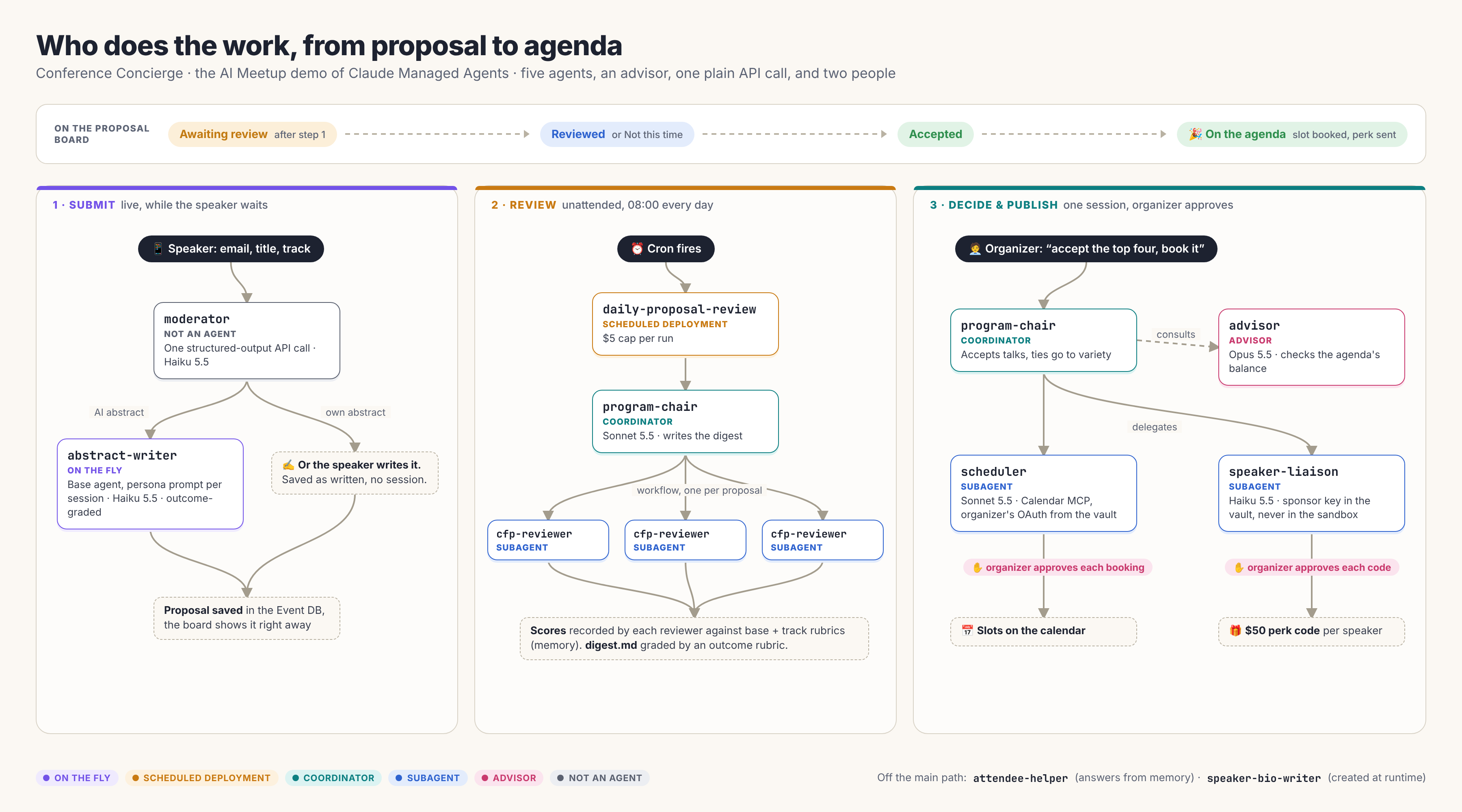
Each interesting CMA feature showcased has a short task guide that points to the exact lines that implement it, and the code carries matching markers. Search the repo for Guide 05 · and you see every step of that guide in place.
What it covers, roughly in the order of this post:
- Phase 1, hosted. Declaring agents with the
antCLI, versioning, memory stores, vaults, OAuth for MCP, a multi-agent coordinator with workflows and an advisor, a scheduled daily review, outcomes, approvals and budgets, and OpenTelemetry. - Phase 2a. The same agents with tools running in your own container.
- Phase 2b. What changes when you run the service yourself. This part is source and instructions only.
The README has the quickstart and the spec has the full design. Fair warning: the code and guides are AI generated and the services are mocks. It is a teaching sample, not production code.
Further reading
- Claude Managed Agents overview and reference
- Scaling Managed Agents with stable interfaces, Anthropic Engineering
- Operating Managed Agents in production, from the cookbook
- Secure deployment
- Building multi-agent systems: when and how to use them
- Migrating from the Agent SDK
Disclaimers: opinions are my own. Product mentions are not endorsements. This post was written with AI assistance and reviewed by me. Managed Agents is in beta, and details here reflect the docs as of November 2026.
These platforms are constantly evolving and I could have missed something. Corrections and suggestions are very welcome. Open an issue or a pull request on the sample, or leave a comment here.